Yellow Dog Consulting

Sales & Marketing Consulting for solo-preneurs.

  • About
    • Shout Outs From Rad Clients
    • Media
  • Marketing Services
    • Kick Ass Follow Up Templates
  • Blog
  • Mailchimp
  • Free Tools
    • Newsletter Setup Checklist
    • Monthly Marketing Calendar
  • Contact

8 Great Ideas From the Clinton Campaign’s Email Footer

10.19.2016 by Elizabeth // Leave a Comment

The thing about running a political campaign is that you send a lot of emails to your supporters. It’s ridiculously overwhelming and very easy for people to unsubscribe so you just go away and stop harassing them for more money. If you follow me on Twitter you’re probably aware #ImWithHer – I promise you this isn’t a political post. The other day after the 7th email from HRC’s campaign I decided that I don’t need to hear from her more times a day than I have to let Norm outside. So I scrolled to the bottom of the email to see if I could reduce the number of emails I receive and what I found instead was BRILLIANT.

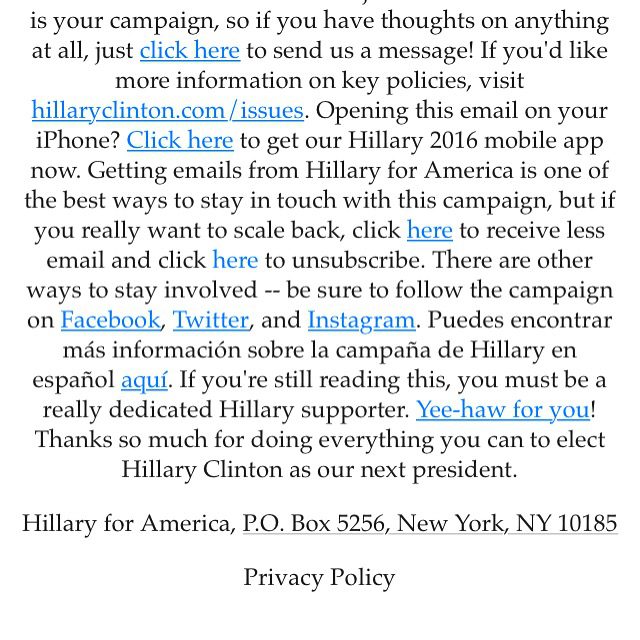
Here’s 8 great ideas I discovered from Hillary’s email footer.
img_3699

  1. Feedback! First things first – this is MY campaign – and they asked for feedback – what a great idea! Asking your contacts for feedback is always awesome. If you send your newsletter on a very regular basis this is a good idea…
  2. Key Policies – I like that they also included a link to more information on her key policies. For a business owner you might say something like “want to learn more about the services we offer? Visit http://yellowdogconsulting.com/services/“
  3. There’s an App! – Small business owners don’t often have apps – but a lot of folks in direct sales might have them, and this is a creative way to remind folks to download the app without overwhelming the newsletter each month, clever.
  4. Update Your Preferences – you can choose to receive less email (which I am terrified of folks who didn’t do that, I still get 5 a day!) or unsubscribe. I like that it’s a bit more sandwiched in and you have to read to find it. Typically I find this annoying but they did it so well…If you have multiple lists or are sending out emails for a variety of offerings I highly encourage creating lists that your subscribers can pick and choose from.
  5. Social Media links – typically I suggest you add in your social media icons earlier in the email, however throwing it right into the footer there for folks who unsubscribe but still want to be aware? This is clever…
  6. There’s a Spanish option! – okay this one honestly makes little sense to me. If I preferred my newsletter in another language this would be more helpful at the very top preview of an email instead of squished into the middle of a footer.
  7. A Super Secret Picture – This is just clever. I like to add easter eggs in blog posts and newsletters occasionally but I hadn’t thought about my newsletter footer before!
  8. Thank You! – A very smart move here, you probably read the email that was sent and you’ve read all the way to the bottom of the footer. Holy crap you do deserve a fun picture and a thank you.

If people scroll to the bottom of your email just to unsubscribe wouldn’t it be cool if instead of leaving you forever they actually became more engaged?

Categories // Branding, Newsletter

What South Park Can Teach You About Your Newsletter

10.12.2016 by Elizabeth // 1 Comment

south-park-yelpOh sure, you think this post is going to be a crazy stretch just so I can weave in pop culture don’t you?

A few years ago there was a documentary about how each week’s episode of South Park is made, and it’s great! The documentary is called “6 Days to Air” and that’s exactly right. From nothing to TV in 6 days. That’s why each episode’s content is so topical. While most TV shows are in production months ahead of time, and might be putting a few final touches on the episode a few weeks out (or days as I’ve heard) the South Park creators decided that they would take FOREVER with each episode given the opportunity. So, they decided to not allow it.

What does this have to do with your newsletter? Well, this morning I had 5 newsletter clients with newsletters that were waiting for approval or “just one more” edit. This post isn’t to pick on my clients, I love my clients, and they pay me to not be annoyed by this. AND I tell my clients that they have to like what they’re sending out, so if it doesn’t feel right to them, we can wait.

HOWEVER, let’s get this baby out the door folks! Way too often it’s an anxiety or wanting it to be PERFECT. Stop that. Done is better than perfect. Have another set of eyes look over your newsletter to help you if you’re stuck. If you’re doing it yourself ask a friend or spouse to take a look. If you’re working with someone like me, we’re both going to take a look. YES typos and broken links still happen on occasion. NO, no one has ever died because a newsletter wasn’t perfect.

When I write my newsletter I typically add it to my to do list on a Monday morning and don’t come up with content till Tuesday or Wednesday. I need to have conversations with clients and friends about what their current challenges are to spark my 3 ideas for the month. But it’s on my to do list and usually ready to send by the end of the week, and sometimes even sooner.

Stop dragging your feet to publish that blog post or send out your newsletter. I promise you you’ll feel relieved when it’s sent.

Categories // Lessons Learned, Newsletter

Your Opt In: An Ethical Bribe

09.21.2016 by Elizabeth // Leave a Comment

Norm and ElizabethThe other day I was talking to a friend about her newsletter, she mentioned she’s working on an “ethical bribe.”  I had to laugh, because let’s be honest, that’s EXACTLY what an opt in IS!

Having an opt in on your website is a great way to provide value to your network and invite them to receive something of value from you FOR FREE. In exchange you get that 2nd most valuable piece from them: their email address. Now they’re signed up for your monthly newsletter and you KNOW they want to hear from you because they already downloaded your handy checklist or white paper.

Don’t Know Where to Start?

Neither did I. My business coach and I had been talking for a while about adding an opt in to my website. And then when I started doing more and more newsletters for clients, I created a checklist for clients so I had everything up front instead of asking for 5 different things in 7 different emails. After a while I realized that I could expand that checklist a bit and create it as a free download.

Is it perfect? No. Is it a good start? Yes. Are people downloading it? YUP. People I know? Sometimes! Strangers? YES!

What Else is There to This?

I setup some automation emails. A few days after they download the thing you reach out to them and introduce yourself, or ask them a question or two. Share some blog posts that relate to your download. Offer a 1:1 call with them if they get stuck. In my checklist I suggest they add me to their newsletter list. And at the end of the 4th email if they still haven’t sent one out I suggest they reach out and we setup a time to chat about it.

It’s time for an “ethical bribe” on your website if you don’t have one. And it needs to be really good content that you’re giving away for free. It’s not the farm, but something they can actually use.

Once they see the value in your knowledge when they have the resources, guess who they’re going to call?

Categories // Follow Up, Newsletter, Sales

  • « Previous Page
  • 1
  • …
  • 7
  • 8
  • 9
  • 10
  • 11
  • …
  • 17
  • Next Page »

About Us

Yellow Dog Consulting is a sales and marketing firm located in Hillsboro, Oregon with clients around the world. We work with small business owners who love what they do, but the sales and marketing part of their job sucks their will to live.

SIGN UP FOR YELLOW DOG NEWS!

Follow Me

  • twitter
  • instagram
  • linkedin
  • envelope-o

© Copyright 2020 Yellow Dog Consulting · All Rights Reserved